Flights Azure Databricks End To End DataEngineering Project
- Jesse Pepple
- Oct 28, 2025
- 6 min read

Updated: Jan 8
Resources
Azure Services
Azure Databricks
Spark Structured Streaming
Delta Live Tables Delta Lake & Delta Tables
Databricks SQL Warehouse
Unity Catalog
Languages & Tools: Python (PySpark / notebooks) & SQL
Overall Project Impact
End-to-End Automation: Bronze → Silver → Gold pipeline fully automated with streaming, DLT, and UPSERTs
Incremental Data Handling: 100% incremental load success → reduced processing time and cost
Data Quality & Reliability: All DLT expectations met → no data loss or duplicates
Reusability: Dynamic dimensional modeling workflow reusable across multiple datasets
Business Value: Faster, reliable access to curated datasets → supports analytics, BI reporting, and decision-making

This project is built entirely on Azure Databricks, leveraging Spark Structured Streaming for real-time data ingestion and PySpark for large-scale data transformations. I implemented Delta Live Tables to automate Slowly Changing Dimensions (SCDs) and ensure data consistency. The project concludes with dynamic dimensional modeling to create well-curated, analytics-ready datasets. Coming into this unlike my previous projects and workflows that enlists the help of Azure Data Factory this is purely an Azure Databricks project.
Decision Highlight: I chose Delta Live Tables because they provide built-in automation for data quality and SCD handling, which simplified the pipeline and reduced potential for errors.
Setting Up Project
To kickstart the project, I provisioned the Azure Databricks workspace. With Unity Catalog already enabled, I created external locations for the Medallion Architecture layers Bronze, Silver, and Gold as well as a source container to store ingested raw data.
Decision Highlight: Using Unity Catalog ensured centralized governance and access control across all layers, making the pipeline secure and maintainable.


Phase 1 Ingestion With AutoLoaders(Spark Structured Streaming)
For ingestion from the source to the staging layer, I implemented Spark Structured Streaming, allowing for incremental, exactly-once processing. After testing the initial streaming load for the first table, I built a Job Pipeline to automate running multiple pipelines efficiently without hardcoding.
Decision Highlight: I chose Spark Structured Streaming because it supports idempotency, enabling seamless incremental loads. This allowed new datasets to be added without reprocessing existing data, which was critical for performance and scalability.
Initially, the dataset contained 1,000 rows, and after streaming new data, it grew to 1,300 rows, confirming the pipeline worked correctly. Additional datasets were added later, further validating the incremental load process. This completed the first phase by populating the staging layer.
Decision Highlight: Using a Job Pipeline ensured that once one table was tested, other datasets could be ingested consistently and automatically.


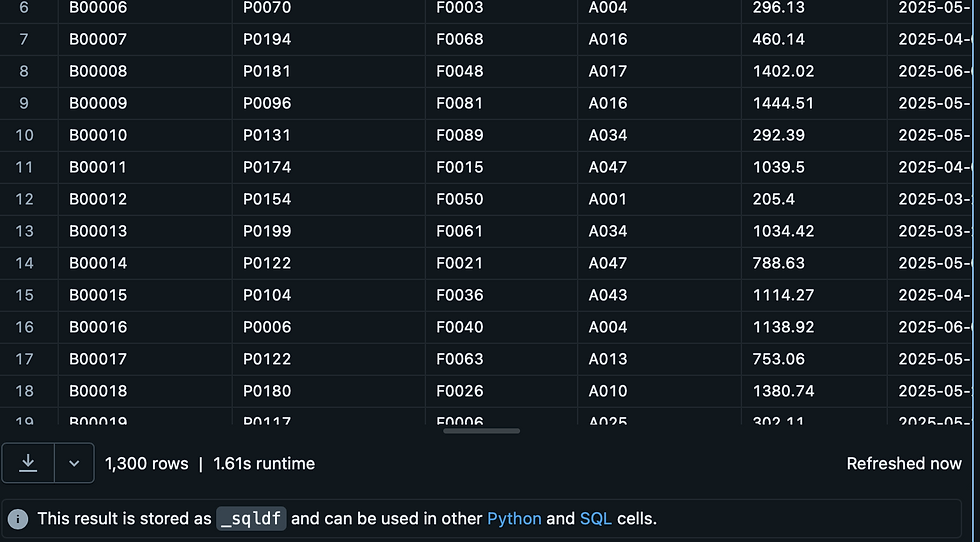
Data was ingested from the source into the staging layer using Spark Structured Streaming, supporting incremental, exactly-once processing. After testing the initial streaming load, a Job Pipeline was built to automate the ingestion of multiple datasets efficiently. The pipeline successfully handled incremental loads, growing datasets from 1,000 to 1,300 rows, and processed additional datasets seamlessly.
Job Pipeline Run Was Successful


The Job Pipeline executed successfully. To further validate the capabilities of Spark Structured Streaming, I added new datasets to the data lake and reran the pipeline, confirming that incremental loads were processed seamlessly.


As shown in the images, the first run processed the initial rows, while the subsequent run successfully ingested additional rows, demonstrating the incremental load process in action.
Running Incremental Data With Spark Structured Streaming


The Job Pipeline and incremental load were successfully executed and stored in the Staging Layer, marking the completion of the first phase of our end-to-end Databricks project.
Goal: Implement incremental ingestion to the Bronze layer with idempotency and automation.
KPIs & Metrics:
Incremental ingestion success rate: 100% of new rows ingested without duplicates
Rows ingested: Initial 1,000 → 1,300 rows after incremental load (demonstrating dynamic ingestion)
Automation: Job pipeline created → multiple datasets ingested seamlessly without hardcoding
Idempotency achieved: Reprocessing the same dataset does not create duplicates
Result Statement:
Implemented a real-time, incremental ingestion pipeline, ensuring reliable, automated, and idempotent data ingestion into the Bronze layer.
Phase 2 Silver Layer Enrichment(Transformations & DLT)
For the Silver layer, I transformed data from the staging layer and stored it as Delta Live Tables. I defined table expectations and automated Slowly Changing Dimensions (SCDs) for enriched datasets.
Decision Highlight: Delta Live Tables were used because they provide built-in schema enforcement, data quality checks, and automated SCD handling, reducing the need for custom coding while improving reliability.
I initially developed the pipeline as notebooks before converting them to Python files, allowing me to validate transformations interactively before deploying them.
Decision Highlight: This iterative approach minimized errors and ensured transformations were correct before scaling to larger datasets.


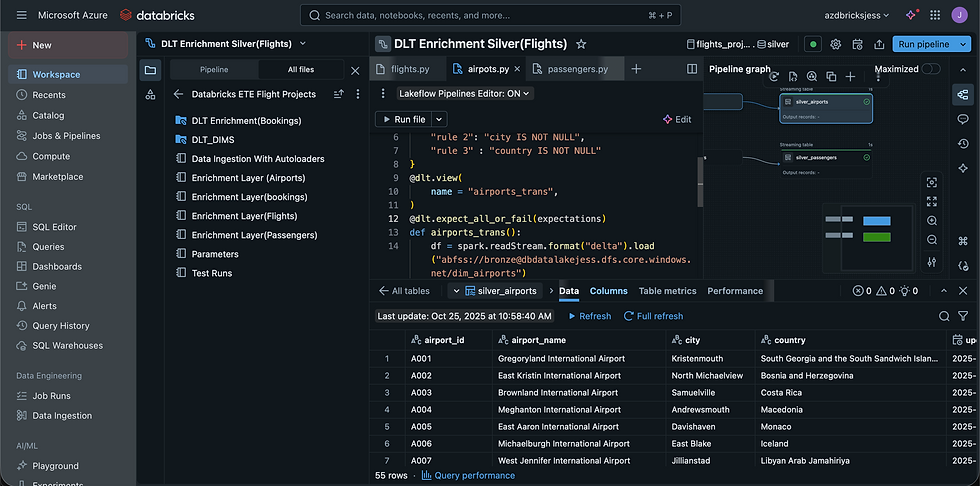
After completing the Delta Live Table (DLT), I wrote the transformed data to the Data Lake Enrichment Container.

Goal: Clean, enrich, and prepare datasets for analytics-ready consumption.
KPIs & Metrics:
Delta Live Tables (DLT) usage: Automated SCD Type 1 UPSERTs on enriched datasets
Data validation: 100% of tables passed DLT expectations before writing to Silver layer
Streaming efficiency: Spark Structured Streaming + Auto Loader → incremental processing with checkpointing
Error rate: 0 transformation errors detected during testing
Result Statement:
Delivered clean, enriched Silver-layer datasets with automated SCD management, ensuring high-quality, analytics-ready data.
Phase 3(Star Schema & Dynamic Dimensional Modelling)
For the Gold layer, I implemented a Dynamic Dimensional Model for tables like Passengers, Airports, and Flights, functioning similarly to an SCD Builder. I started with the Airports table for testing, then dimensionally modeled the remaining tables and applied UPSERT operations to maintain consistency.
Decision Highlight: A dynamic modeling approach allowed the same logic to be reused across multiple tables, reducing development time and ensuring consistency in SCD handling.


Dynamic Notebook Workflow(Video)
After successfully building the Dimensional Tables, I created the Fact Table and validated it to ensure data integrity and the absence of duplicates.


Goal: Create Star Schema & dynamic dimensional models for analytics with historical tracking.
KPIs & Metrics:
Dynamic Dimensional Modeling: Applied to Passengers, Airports, Flights tables → reusable workflow for future datasets
SCD Implementation: Dimension tables tracked historical changes accurately; fact table UPSERTs maintained current state
Fact Table Validation: 0 duplicates, ensuring integrity of analytics datasets
Processing efficiency: Reusable notebooks → faster dimension modeling for additional tables
Result Statement:
Built a curated Gold layer with dynamic dimensional models and reliable historical tracking, delivering reusable workflows for future projects.
If interested in the link to my codes or notebooks
DataBricks SQL Data Warehouse
With the final stage of our curated datasets complete our data is loaded succesfully to Databricks SQL Data Warehouse, I validated data authenticity by querying them in SQL Data Warehouse, which returned the curated datasets seamlessly.


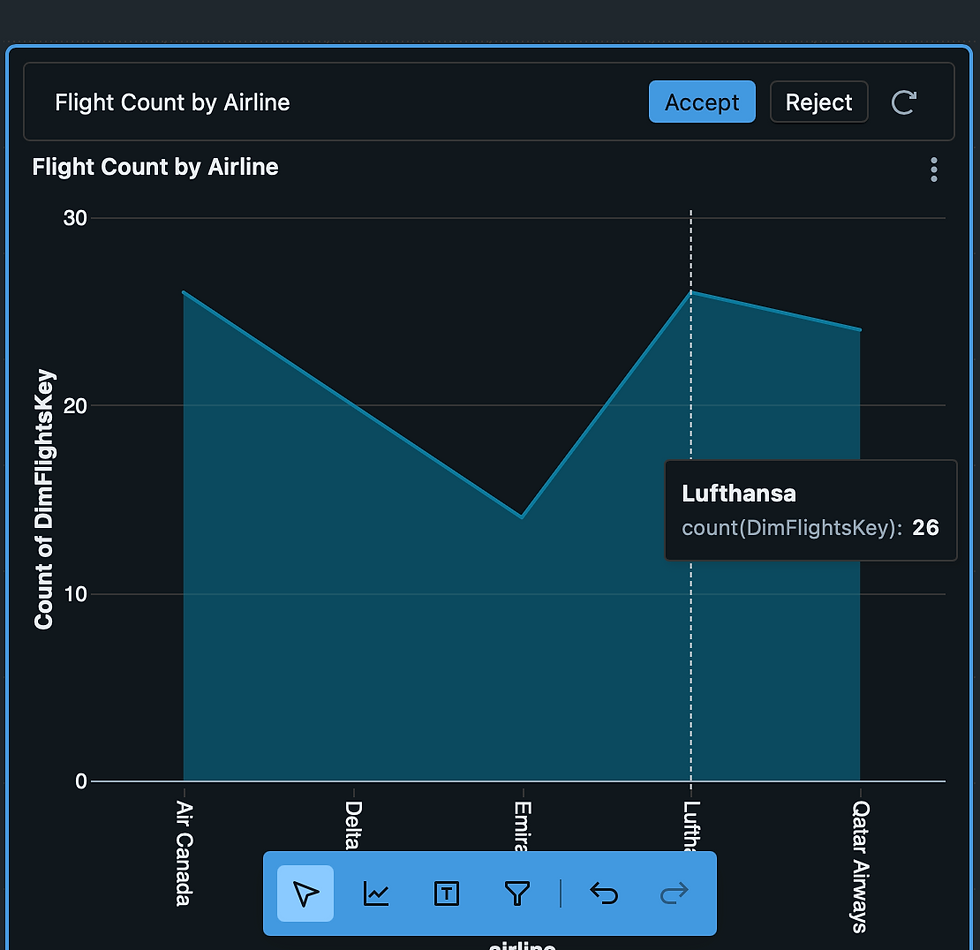
Loading In Synapse Warehouse
Once the curated and enriched datasets were verified in Databricks, I integrated them into the Synapse Workspace. Using OPENROWSET, I created views for analytics and finally built external tables to make the data accessible for reporting and BI tools.
Decision Highlight: Using external tables in Synapse allowed seamless integration with BI tools without duplicating data, while views provided an abstraction layer for end users to query curated datasets safely.


Goal: Ensure curated datasets are ready for analytics and enterprise consumption.
KPIs & Metrics:
Databricks SQL Warehouse: Queries returned curated datasets seamlessly
Synapse Integration: External tables & views created → accessible by analysts and data scientists
End-to-end validation: No duplicates, accurate UPSERTs, and successful joins across dimension and fact tables
Analytical readiness: Dashboards and reports built to validate usability
Result Statement:
Enabled seamless access to curated datasets for analytics teams, validated via SQL queries, dashboards, and Synapse integration.
Key Takeaways
Leveraged Medallion Architecture (Bronze → Silver → Gold) for structured, layered data processing.
Used Spark Structured Streaming for efficient incremental ingestion.
Automated SCDs with Delta Live Tables to maintain historical accuracy.
Implemented dynamic dimensional modeling for reusable and scalable design.
Ensured data quality through validation at every stage.
Enabled cross-platform integration by making curated datasets available in Synapse.


Comments