Walmart Azure/Fabric Data Engineering Project With Databricks SDP And DAB

Project Overview
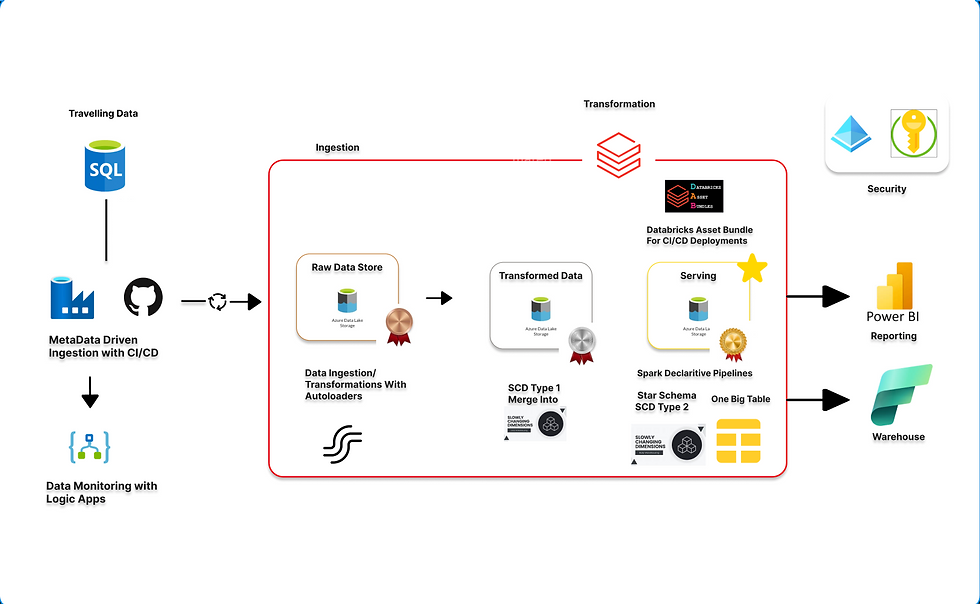
This project is an end-to-end data engineering solution designed to demonstrate the development of a modern, scalable, and production-oriented data platform using Azure Data Factory, Azure Data Lake Storage Gen2, Azure Databricks, and Microsoft Fabric. The solution incorporates metadata-driven ingestion, incremental processing, data quality, monitoring, CI/CD, automated CDC/SCD handling, and multiple downstream consumption patterns.
The pipeline begins with Azure SQL Database as the source, with Azure Data Factory responsible for orchestrating metadata-driven and incremental ingestion. I implemented a JSON-based watermarking approach using the source load_date to identify new and changed records, allowing the same ingestion framework to dynamically process multiple tables without requiring separate hard-coded pipelines for each source. Azure Data Factory was integrated with GitHub-based version control and CI/CD practices, while Azure Logic Apps were implemented for automated monitoring and email alerting when scheduled pipeline executions fail.
Once the data is ingested into Azure Data Lake Storage Gen2, it is incrementally loaded into the Bronze layer of Databricks using Auto Loader. A reusable loop-based ingestion framework allows multiple datasets to be processed consistently while supporting incremental and idempotent ingestion, reducing unnecessary reprocessing and manual intervention.
The Silver layer focuses on cleansing, standardisation, enrichment, and preparation of the Bronze datasets for downstream processing. I implemented the transformation logic using Python and Object-Oriented Programming (OOP), creating reusable transformation classes that improve modularity, maintainability, and testability. Transformations include null handling, deduplication, CDC timestamp enrichment, and incremental upserts using Delta Lake MERGE INTO.
For the Gold layer, I utilised Spark Declarative Pipelines (SDP) and Databricks Auto CDC Flow to automate the curation of production-ready datasets and implement Slowly Changing Dimension Type 2 (SCD Type 2) processing for dimensional data. Data quality expectations were also incorporated into the pipelines to validate the curated datasets before they were made available for downstream consumption.
The curated Gold layer was designed to support dual consumption patterns. A Fact and Dimension star schema provides structured datasets for business intelligence, reporting, and analytical workloads, while a denormalised One Big Table (OBT) provides a consolidated dataset suitable for Machine Learning and Data Science use cases.
The Databricks solution was deployed using Databricks Asset Bundles, enabling Databricks notebooks, configurations, and resources to be version-controlled and deployed consistently. I also implemented unit testing for the reusable Python transformation classes and validated the curated datasets within Databricks SQL Warehouse, including the creation of dashboards to demonstrate analytical consumption.
Finally, the curated Gold datasets were made available within Microsoft Fabric. I configured the required IAM permissions and utilised OneLake Shortcuts to expose the curated data within Fabric without unnecessarily duplicating the underlying datasets. The data was subsequently validated within the Fabric Lakehouse and made available through a Fabric Data Warehouse for further SQL-based analysis and reporting.
Overall, the project demonstrates a complete Bronze → Silver → Gold lakehouse architecture, bringing together metadata-driven ingestion, incremental and idempotent processing, reusable OOP transformations, automated CDC/SCD processing, data quality controls, monitoring, testing, CI/CD, and cross-platform data consumption. It demonstrates how a scalable data platform can support both traditional BI and analytical workloads alongside Data Science and Machine Learning use cases.
Overall Project Impact
End-to-End Automation: Automated the complete data lifecycle from metadata-driven and incremental ingestion through transformation and delivery, orchestrated using Azure Data Factory and processed in Azure Databricks with Auto Loader and Spark Declarative Pipelines, significantly reducing manual intervention and improving pipeline reliability.
Version Control & CI/CD: Managed Azure Data Factory pipelines, Databricks notebooks, transformation code, and configurations through GitHub, with automated deployments using Databricks Asset Bundles, ensuring reproducible deployments, consistent environments, and maintainable data engineering workflows.
Scalability & Maintainability: Implemented a metadata-driven ingestion framework and Databricks Auto Loader to support incremental processing, schema evolution, and efficient onboarding of new datasets. Reusable OOP-based transformation classes further improved code modularity, maintainability, and reusability across the Silver layer.
Data Quality & Historical Tracking: Implemented Delta MERGE operations within the Silver layer and automated SCD Type 2 processing in the Gold layer using Spark Declarative Pipelines and Auto CDC Flow, ensuring reliable incremental updates while preserving historical changes for accurate analysis.
Analytics & ML Enablement: Delivered dual consumption models consisting of a dimensional Fact and Dimension star schema for BI and analytical workloads and a One Big Table (OBT) designed for Data Science and Machine Learning use cases, providing flexible access to curated data for different downstream requirements.
Monitoring & Reliability: Integrated Logic Apps for pipeline monitoring and alerting, improving operational visibility and enabling faster identification and response to pipeline failures.
Business Value: Delivered analytics-ready curated datasets to Databricks SQL Warehouse and Microsoft Fabric Data Warehouse, using OneLake shortcuts to enable cross-platform consumption while minimising unnecessary data duplication and improving accessibility for downstream analytical consumers.
Technologies Used
Layer | Technology | Description |
Ingestion | Azure Data Factory | Orchestrates metadata-driven and incremental batch ingestion from source systems into the data lake |
Storage | Azure Data Lake Storage Gen2 | Scalable cloud storage for raw, processed, and curated data across the medallion architecture |
Bronze Ingestion | Databricks Auto Loader | Incrementally ingests new files into Databricks with scalable file discovery and schema evolution |
Processing | Azure Databricks / Apache Spark | Distributed data processing and transformation across the Bronze, Silver, and Gold layers |
Transformations | PySpark & OOP Classes | Reusable, modular transformation logic implemented using object-oriented programming in the Silver layer |
Incremental Processing | Delta Lake MERGE | Handles inserts and updates within the Silver layer to maintain current and consistent datasets |
Gold Curation | Spark Declarative Pipelines | Manages production-grade Gold transformations and curated datasets |
CDC / SCD Handling | Auto CDC Flow / SCD Type 2 | Automates change data capture and maintains historical versions of dimension records in the Gold layer |
Data Modeling | Star Schema & One Big Table | Provides dimensional Fact/Dimension models for BI and an OBT for Data Science and ML workloads |
Monitoring | Azure Logic Apps | Provides pipeline monitoring, failure notifications, and operational alerting |
Data Warehouse | Databricks SQL Warehouse & Microsoft Fabric Data Warehouse | Serves curated datasets for SQL analytics, BI, reporting, and downstream consumption |
Data Sharing | Microsoft Fabric OneLake Shortcuts | Enables Fabric to consume curated data without unnecessary duplication of the underlying datasets |
CI/CD | GitHub & Databricks Asset Bundles | Provides version control and automated, reproducible deployment of Databricks code and resources |
Architecture | Medallion Architecture | Organises data into Bronze, Silver, and Gold layers to separate ingestion, transformation, and curated consumption |
Phase 1 Data Factory Ingestion
The project began with the creation of a Git repository to enable version control and support the structured deployment of Azure Data Factory artifacts. A dedicated development branch was established to manage feature enhancements and isolate ongoing updates from the main production branch, ensuring a controlled, organized, and collaborative development workflow.


During the pipeline development, I implemented a JSON-based watermarking strategy to manage the transition from an initial historical backfill to ongoing incremental ingestion.
I created two JSON files to manage this process. The first, cdc.json, stores the current watermark value used by the ingestion pipeline. For the initial load, I configured the watermark to 1900-01-01, a date intentionally set before the earliest available source record, allowing the pipeline to perform the initial historical backfill.
The second JSON file was created as an empty watermark file to support the transition from the initial historical backfill into the incremental ingestion process. Once the historical data had been successfully processed, the watermark could be updated based on the latest processed load_date, allowing subsequent pipeline runs to retrieve only newly available or changed records.
This approach provided a controlled mechanism for moving from historical backfill → incremental ingestion, while maintaining the pipeline's processing state and preventing previously ingested records from being unnecessarily reprocessed.


An IF Condition activity controls the ingestion workflow based on whether new data is available. When new records are identified, the pipeline processes the data and performs the required backfill based on the latest load_date. If no new data is available, the pipeline automatically removes the previously ingested dataset, helping maintain data integrity and prevent duplicate data from being carried forward.
By combining pipeline parameters, dynamic ingestion logic, JSON watermarking, and conditional processing, this phase provides a flexible ingestion framework that can support multiple SQL tables while reducing pipeline duplication and manual intervention.
Using the output from the MAX CDC script, an additional column was added in the update_cdc copy activity to backfill data up to the last_load value, ensuring that last_load.json in the data lake accurately reflected the latest processed records. While the pipeline initially processed data successfully, reruns were loading the entire dataset repeatedly. To resolve this, I implemented an IF activity using @greater(activity('SQLToLake').output.dataRead, 0). With this logic, the pipeline only ingests new data when available, preventing duplication of existing records—an approach particularly effective for scheduled pipeline runs. To finalise this pipeline and automate the workflow, I used a ForEach activity to load all the data from SQLDB with no manual intervention.


Pipeline was successful, and the cdc_json file was updated according to the process date. I also designed the ingestion framework with two execution approaches. The first is a manual ingestion pipeline, where a user can specify the table they want to ingest through the pipeline parameters. The second is an automated ingestion pipeline, which can process the required datasets without manual intervention. This approach resulted in a reusable and scalable ingestion framework capable of supporting multiple Azure SQL tables while maintaining incremental processing, state tracking, and controlled data movement into the data lake. The successful pipeline executions and automatic CDC JSON updates demonstrate that the framework can reliably manage successive incremental loads without repeatedly ingesting previously processed data.

Phase 1.1 Monitoring with Logic Apps
Following the development of the ingestion pipelines, I integrated Azure Logic Apps to provide automated monitoring and alerting for scheduled pipeline runs. This enables pipeline execution status to be tracked and potential failures to be identified promptly, improving the overall reliability and operational visibility of the ingestion process.


Following the development of the ingestion pipelines, I integrated Azure Logic Apps via an API call to monitor the status of scheduled Azure Data Factory pipeline runs. When a pipeline execution fails, the Logic App is triggered and automatically sends an email notification, providing immediate visibility of failures and enabling issues to be identified and addressed promptly.

Once the pipeline development was completed, I committed the final implementation to GitHub through our feature branch. I then created a Pull Request (PR) from the development branch into the main branch, allowing the changes to be reviewed and validated before being merged into the main codebase. This provided a controlled deployment workflow and ensured that the completed pipeline was version-controlled and maintained within the project repository.

Phase 2 Bronze Ingestion With AutoLoaders
With the Azure Data Factory ingestion framework completed, I moved on to preparing the Databricks environment for incremental ingestion and Bronze-layer processing using Auto Loader.
Before implementing the Bronze ingestion pipelines, I established the required Unity Catalog architecture and Azure storage access. This involved creating the appropriate catalogs and external locations and configuring the required IAM permissions so that Databricks could securely interact with the Azure Data Lake Storage Gen2 environment.
The external locations provided Databricks with controlled access to the relevant data lake paths, while the IAM configuration ensured that the Databricks environment had the appropriate permissions to read and write data without exposing unnecessary access.
I also initialised Databricks Asset Bundles at this stage to establish the deployment structure for the Databricks components. This provided the foundation for managing notebooks, configurations, and other Databricks resources through version control and deploying them consistently across environments.
Once the Unity Catalog, external locations, IAM configuration, and Asset Bundle structure were established, the environment was ready for the next stage: implementing Databricks Auto Loader to incrementally ingest the data into Bronze Delta tables.

After creating IAM roles and permissions I proceeded to create external locations in our Databricks external locations.


After establishing the Databricks environment, Unity Catalog structure, external locations, IAM configuration, and Databricks Asset Bundle, I began implementing the Bronze-layer ingestion using Databricks Auto Loader.
To avoid creating separate ingestion logic for each dataset, I implemented a loop-based ingestion process that dynamically iterates through the required datasets and applies the same Auto Loader framework across all of them. This allowed the entire set of datasets to be ingested through a consistent and reusable process.
Auto Loader was configured to support incremental and idempotent ingestion, ensuring that only newly available files were processed while previously ingested data was not unnecessarily reprocessed. This provides reliable ingestion behaviour and allows the Bronze layer to scale as additional data arrives in the data lake.
The resulting implementation provided a fully automated Bronze ingestion framework, reducing repetitive code and manual intervention while ensuring that datasets were consistently ingested into their respective Bronze tables.


Phase 3 Silver Transformation & Enrichment
With the Bronze ingestion successfully implemented using Auto Loader, I moved into the next stage of the project: cleaning, standardising, and enriching the raw datasets within the Silver layer.
To make the transformation process reusable and maintainable, I implemented the transformation logic using Python classes and Object-Oriented Programming (OOP). This allowed common transformation operations to be encapsulated into reusable methods and applied consistently across multiple datasets, reducing code duplication and simplifying future maintenance.
The Silver transformations included handling null values, adding a CDC timestamp column, and deduplicating records to improve the quality and consistency of the data. These transformations prepared the raw Bronze datasets for downstream analytical processing and Gold-layer curation.
For incremental updates, I implemented Delta Lake MERGE INTO operations to perform reliable upserts into the Silver tables. This allowed new records to be inserted while existing records could be updated based on the relevant business keys, ensuring that the Silver layer maintained an accurate and current representation of the source data.
Overall, this stage established a clean, enriched, and incrementally maintained Silver layer, while the use of reusable Python classes provided a modular foundation for applying consistent transformation logic across the entire data platform.


Phase 4 Gold Curated Data With SDP And SCD Type 2 and 1
With the Silver layer successfully created and incrementally maintained, I moved into the Gold layer, where the cleaned datasets were curated into analytics-ready structures for downstream consumption.
I created both Fact and Dimension tables using a dimensional star schema, alongside a One Big Table (OBT) to support alternative analytical and Data Science workloads. For the Dimension tables, I implemented SCD Type 2 to preserve historical changes and maintain a complete history of dimensional records. For the Fact tables and OBT, I implemented SCD Type 1-style upserts, ensuring that the datasets maintained the latest available values without retaining historical versions.
To implement this efficiently, I utilised Spark Declarative Pipelines (SDP) to define and manage the Gold-layer transformations and data flows. This provided a structured and maintainable approach to building the curated datasets while supporting automated processing.
I also implemented data quality expectations within the pipelines to validate the data before it was made available for analytical consumption. These expectations provided controls around the quality and integrity of the curated datasets, helping prevent poor-quality records from being served to downstream consumers.
Overall, this stage transformed the clean Silver datasets into business-ready analytical models, providing both historical dimensional analysis through SCD Type 2 and current-state Fact/OBT datasets for efficient downstream consumption. I also made the Data optimised in the pipeline, using the autoOptimized initaion for SDP


Expectations were met successfully
Following the successful execution of the curated Spark Declarative Pipeline (SDP), all configured data quality expectations and validation checks completed successfully with no issues identified. This confirmed that the curated Fact, Dimension, and OBT datasets met the defined quality requirements before being exposed to downstream consumers.
The successful validation provided confidence that the curated datasets were reliable, consistent, and fit for purpose, allowing them to be served for both analytical and Machine Learning/Data Science workloads.

Phase 5: Finishing touches and deploying to Fabric Warehouse and SQL Warehouse
With the curated datasets successfully validated, I moved into the deployment and downstream consumption stage of the project. The curated datasets were deployed to the Gold layer within the data lake, providing the final trusted data assets for downstream analytical and Machine Learning workloads.
I then configured the downstream integration required to make these curated datasets available within Microsoft Fabric, enabling cross-platform consumption of the Gold-layer data. This allowed the curated datasets to be accessed within Fabric without unnecessarily duplicating the underlying data.
As part of the deployment process, I also implemented and executed unit tests for the Python utility and transformation components, validating the functionality and reliability of the reusable code developed throughout the project.
The Databricks environment and associated resources were deployed using Databricks Asset Bundles, with the implementation managed through GitHub version control. This provided a repeatable deployment process and ensured that the Databricks code and configuration remained version-controlled.
Finally, I validated the availability and integrity of the curated datasets within the Databricks SQL Warehouse, confirming that the Gold-layer data had been successfully served and was accessible for downstream analytical consumption.
Overall, this final stage completed the transition from data ingestion and transformation to production-ready data delivery, with the curated datasets successfully deployed, tested, validated, and made available across Databricks and Microsoft Fabric for BI, analytics, and ML/Data Science use cases.
Gold DataLake write
As the final stage of the project, I created an end-to-end orchestration pipeline that connects the complete data lifecycle, from initial ingestion through to the final Gold-layer delivery.
The pipeline executes the workflow in sequence:
Ingestion → Silver Transformation → Gold Curation → Writing Curated Data to the Gold Layer
To make the final data-writing process dynamic, I utilised the ForEach activity within the Databricks job to iterate through the curated datasets produced by the Gold layer. I also implemented dbutils.jobs.taskValues.set to pass the relevant dataset information between tasks. This allowed a single downstream writing task to dynamically process and write the required curated datasets rather than creating individual task activities for each dataset.
This approach significantly simplified the orchestration of the final Gold-layer delivery by making the workflow dynamic, reusable, and easier to maintain. The successful execution of the pipeline confirmed that the complete data flow could run from ingestion through transformation, curation, and final Gold-layer delivery as a unified process.
Overall, this completed the project's end-to-end automation, demonstrating that the individual components of the platform could operate together as a cohesive and production-oriented data pipeline.

Python Class Testing
As part of the deployment phase, I initiated unit testing for the reusable Python classes developed for the Silver-layer transformation process. The tests were designed to validate that the individual transformation methods were functioning as expected and producing the correct results.
The testing covered the core transformation utilities used within the pipeline, ensuring that the reusable classes could reliably perform their intended operations before being deployed as part of the wider data platform.
The test suite executed successfully with all tests passing, providing confidence in the reliability and consistency of the Python transformation components and supporting the overall quality of the production deployment.

Github Repository
Attached are the notebooks and Git repository of our project
Databricks SQL Warehouse Validation
Following the successful completion of the Python class tests, I validated the curated Gold datasets within Databricks SQL Warehouse to ensure that the data had been successfully delivered and was accessible for downstream consumption.
I performed validation checks against the curated datasets to confirm that the Fact, Dimension, and OBT tables were available and contained the expected data following the end-to-end pipeline execution.
The validation was successful, confirming that the curated datasets were correctly served through the Databricks SQL Warehouse and were ready to support downstream BI, analytical, and Data Science/ML workloads.


Dashboards
Following the successful validation of the curated datasets in Databricks SQL Warehouse, I created dummy dashboards within Databricks to demonstrate the analytical consumption of the Gold-layer data.


Asset Bundles Deployment
Followed afterwards I and deployed our Databricks asset bundles

Loading to Fabric using shortcuts
With the curated datasets successfully available through Databricks SQL Warehouse, I moved on to integrating the Gold-layer data with Microsoft Fabric for downstream consumption.
To establish secure access between Fabric and the data lake, I configured the required IAM permissions, granting the appropriate Fabric user access to the underlying data. This ensured that Fabric could securely access the curated datasets while maintaining controlled permissions over the data lake environment.
For the data integration itself, I chose to utilise Microsoft Fabric OneLake Shortcuts. Although there are several approaches available for making data accessible within Fabric like Mirroring to name a few, I selected Shortcuts as the most suitable approach for this project because they allow Fabric to reference the existing curated data in the data lake without creating an additional physical copy of the datasets.
This approach reduces unnecessary data duplication while allowing the same curated Gold-layer datasets to be consumed within the Fabric ecosystem. It also provides a more efficient cross-platform architecture by maintaining the data in its existing storage location while exposing it to Fabric for downstream analytical workloads.
The successful implementation of the IAM configuration and OneLake Shortcuts enabled the curated datasets to be accessed within Microsoft Fabric, completing the integration between the Databricks-based lakehouse environment and the Fabric analytics ecosystem.


Data Validation and Dashboard Creation
Once the curated datasets were successfully made available within Microsoft Fabric, I created the corresponding Lakehouse tables and validated the data to ensure that the datasets had been loaded correctly and maintained their expected structure and values.
Following the Lakehouse validation, I provisioned a Fabric Data Warehouse to provide a dedicated environment for structured analytical consumption. This enabled the curated datasets to be further utilised for SQL-based analysis, reporting, and dashboard development within the Fabric ecosystem.
This stage confirmed that the data could successfully transition from the underlying data lake into the Fabric Lakehouse and Warehouse, providing a validated foundation for downstream analytics and visualisation.


Lesson Learned
Project Conclusion & Architectural Reflection
With the completion of the project, the end-to-end data platform successfully demonstrated metadata-driven ingestion, incremental processing, scalable transformations, automated CDC/SCD handling, CI/CD, data quality, monitoring, and dual-platform data consumption across Databricks and Microsoft Fabric.
One architectural learning I took from this project relates to the use of MERGE INTO within the Silver layer. While implementing MERGE INTO for incremental upserts is a valid approach and worked successfully within this project, I believe that for future workflows I would keep the Silver layer more focused on data cleansing, deduplication, null handling, standardisation, and business transformations rather than implementing SCD logic manually within the layer.
Since Auto CDC Flow can automate SCD Type 1 and Type 2 processing, I would prefer to centralise this change-data and historical tracking logic within the appropriate curated layer rather than manually implementing similar logic in Silver and then applying SCD processing again in Gold. This would create a cleaner separation of responsibilities between the layers and reduce unnecessary duplication of transformation logic.
This is an architectural preference based on what I learned while developing the project rather than a claim that the approach implemented here is incorrect. The implementation was successful and provided valuable practical experience in understanding how different approaches to incremental processing, CDC, and dimensional modelling can be applied within a modern lakehouse architecture.
Overall, this project has strengthened my understanding of production-oriented data engineering, particularly around designing reusable ingestion frameworks, building maintainable transformation pipelines, implementing automated CDC/SCD processing, applying data quality controls, deploying through CI/CD, and making curated data available across multiple analytical platforms.
The project therefore concludes with a fully functioning end-to-end data platform, while also providing architectural lessons that I can apply to make future implementations cleaner, more maintainable, and better aligned with the capabilities of modern Databricks data engineering workflows.


Comments