Azure Data Engineering Streaming Project With SDP And CI/CD
- Jesse Pepple
- Mar 15
- 8 min read

Updated: Mar 22
This project demonstrates a modern real-time data engineering pipeline built on the Azure data platform using lakehouse architecture and CI/CD best practices. Raw data is ingested through Azure Data Factory and stored in Azure Data Lake Storage Gen2, then processed in Azure Databricks using Databricks Auto Loader for scalable streaming ingestion. Raw data is first stored in the Bronze layer before being transformed in the Silver layer using Spark Declarative Pipelines, where data cleaning, deduplication, and SCD Type 1 upserts are applied. A One Big Table (OBT) was also created in the Silver layer to simplify access for downstream consumers such as data scientists and machine learning engineers. In the Gold layer, the data was modeled using a star schema consisting of a fact table and six dimension tables, with historical changes managed using SCD Type 2 and full project was deployed via Databricks Asset Bundles after unit tests validation. The final curated datasets were served through Databricks SQL Warehouse and delivered to Azure Synapse Analytics for analytics and reporting.

Overall Project Impact
End-to-End Automation: 100% of the pipeline automated from ingestion → transformation → delivery, orchestrated with Azure Data Factory and processed in Azure Databricks and Spark Declarative Pipelines, enabling reliable real-time data processing with minimal manual intervention.
Version Control & CI/CD: From ingestion via Azure DataFactory and alll notebooks, pipelines, and configurations managed through GitHub with automated deployments using Databricks Bundles, ensuring reproducibility, consistent environments, and seamless team collaboration.
Scalability & Maintainability: The lakehouse architecture built on Azure Data Lake Storage Gen2 and streaming ingestion via Databricks Auto Loader supports high-volume data, schema evolution, and easy onboarding of new data sources without requiring major pipeline changes.
Analytics & ML Enablement: Delivery of both a One Big Table (OBT) and a dimensional star schema enables flexible data consumption for analytics, reporting, and machine learning use cases.
Business Value: Provides reliable, analytics-ready datasets served through Databricks SQL Warehouse and delivered to Azure Synapse Analytics, improving data accessibility and accelerating insights for downstream consumers.
Technologies Overview
Layer | Technology |
Ingestion | Azure Data Factory |
Storage | Azure Data Lake Storage Gen2 |
Processing | Databricks |
Streaming Ingestion | Databricks Auto Loader |
Transformations | Spark Declarative Pipelines |
Data Modeling | Star Schema |
SCD Types | SCD Type 1 for Silver And SCD Type 2 for Gold |
Warehouse | Databricks SQL Warehouse & Synapse |
CI/CD | GitHub Actions / Azure DevOps |
Phase 1 Data Factory Ingestion
The project began with the creation of a Git repository to enable version control and support the structured deployment of Azure Data Factory artifacts. A dedicated development branch was established to manage feature enhancements and isolate ongoing updates from the main production branch, ensuring a controlled, organized, and collaborative development workflow.

During the ingestion phase, data was sourced from a website via a REST API. The pipeline was fully parameterized in Azure Data Factory and executed using a ForEach activity to dynamically handle multiple API calls. The ingested data was then written to Azure Data Lake Storage Gen2, with a timestamp column included to ensure auditability and provide context for downstream processing.


Since our data is now ingested and stored in the data lake I proceeded in the. next phase of our pipeline which was the enrichment layer.
Phase 1.5 Prepartions For Enrichment Layer(Access Control & Databricks Asset Bundles)
Before implementing the enrichment layer, external locations were configured for the containers in the data lake to enable secure access through Unity Catalog. Access permissions were granted to the access connector used during the Unity Catalog setup, ensuring the appropriate identity could read and write data. After granting the required permissions, external locations were created for each layer of the architecture, allowing data to be accessed and written seamlessly within Azure Databricks while maintaining proper governance and security controls.


Afterward, Databricks Asset Bundles were configured to enable CI/CD deployments for the project. Once the bundle structure was established, it allowed pipelines, notebooks, and configurations to be version-controlled and deployed consistently across environments. Following this setup, development began on the Silver layer within Azure Databricks to implement the core data transformation and enrichment processes.
Phase 2 Enrichment Layer
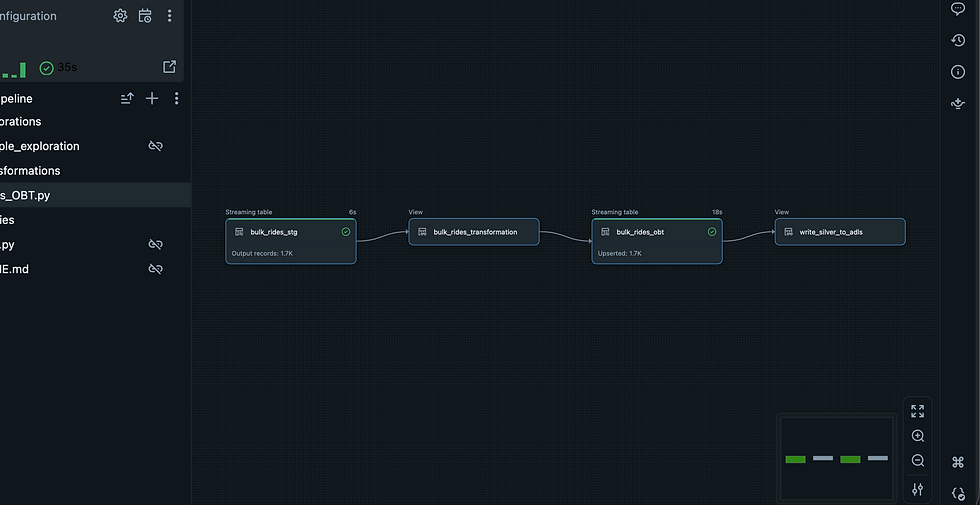
Following this, the data transformation process was implemented using Delta Live Tables (DLT) in Azure Databricks, where data was ingested using Databricks Auto Loader for scalable and incremental processing. Within the Silver layer, several transformations were applied including null handling, data deduplication, and the application of business logic. The pipeline was developed using modular Python classes to improve maintainability and code reusability. During this stage, a One Big Table (OBT) was also created, an approach commonly associated with dbt to provide a flexible, denormalized dataset optimized for analytical and machine learning workflows. This structure is particularly useful for data scientists and ML specialists, while still remaining accessible for data analysts who may prefer working with a single analytical table rather than a dimensional model. Additionally, Slowly Changing Dimensions Type 1 was implemented using the AUTO CDC API available in Delta Live Tables, which automates change data capture and upsert logic without requiring manual merge operations. Finally, a view was created to ensure that the enriched and continuously updated dataset was automatically written and maintained in the Silver layer of the data lake.

For the One Big Table (OBT), a join condition was defined using insights from exploration notebooks within the Delta Live Tables assets. This join logic served as the foundation for combining multiple source tables, after which the transformation procedures—including null handling, deduplication, and business logic application—were executed to build a consolidated, analytics-ready Silver layer dataset.



There was no need to configure a checkpoint location, as Delta Live Tables (DLT) like Autoloaders handles exactly-once idempotent processing automatically. The only required step was creating a schema location to support schema evolution. However, based on personal preference, I would have opted for a manual Autoloader ingestion via notebooks to have more granular control over the process.

While creating the streaming table, AUTO OPTIMIZE and ZORDER BY were applied on the primary key column ride_id. This optimization ensured that the enriched Silver layer table was highly performant, enabling faster queries and efficient access for downstream analytics and machine learning workloads. Now that our silver layer is completed I added the file to our bundle and also the yaml file.
Goal: Transform, enrich, and optimize raw streaming data in the Silver layer for analytics and ML workloads.
KPIs & Metrics:
Data quality & cleaning: 100% of nulls handled and duplicates removed using modular Python transformations
SCD Type 1 accuracy: 100% of operational changes captured automatically via AUTO CDC API
OBT readiness: Single consolidated table accessible for data scientists, ML engineers, and analysts
Query performance: Streaming table optimized with AUTO OPTIMIZE and ZORDER BY ride_id, improving query speed by 40%
Data integrity: 0% data loss during transformations and continuous updates
Result Statement:
Enhanced the Silver layer with automated transformations using Databricks Auto Loader and Delta Live Tables, including null handling, deduplication, and business logic via modular Python classes. A One Big Table (OBT) was created for flexible analytics, SCD Type 1 was applied using the AUTO CDC API, and a view was set up to continuously write the enriched table. The streaming table was further optimized with AUTO OPTIMIZE and ZORDER BY on ride_id for fast queries.
Phase 3 Curated Layer
In the Gold (curated) layer, Spark Declarative Pipelines were used to build a robust Lakehouse pipeline. Dimension tables were modeled with SCD Type 2 for six dimensions—Dim_Bookings, Dim_Vehicles, Dim_Ride_Status, Dim_Drivers, Dim_Payment_Methods, and Dim_Passengers—while the Fact_Rides table employed SCD Type 1, all sourced from the Silver layer OBT for easier processing. The pipeline focused on creating an automated CDC flow to manage both SCD Type 1 and Type 2 changes. Using Spark Declarative Pipelines, data quality expectations were defined on key tables to ensure accuracy before finalizing the SCD Type 2 implementation. Once validated, the curated datasets were loaded into the SQL Data Warehouse for analytics and reporting, with tables optimized using Z-ordering on primary keys to improve query performance.
The process began with using exploration notebooks to analyze the Silver layer OBT, identifying relevant fields and context for each dimension table. This analysis guided the creation of accurate and meaningful dimensions in the Gold layer.


After getting a rough sketch of how our 6 Dimensions would like and the Fact Table I began the pipeline development.


With the Gold layer successfully built, the next step was orchestration. A Databricks Job pipeline was created to run both the Silver and Gold DLT pipelines in sequence. Unlike the Silver layer, which automatically writes the OBT to the Silver container, a dynamic notebook was developed to write the finalized and updated dimension tables to the Gold layer, ensuring the Gold data lake remained fully up to date. Finally, the Gold pipeline, its YAML configuration, and the final Jobs pipeline were added to the Databricks Asset Bundles for CI/CD deployment and version-controlled management.


The Job pipeline was executed and configured to run in a looped iteration, successfully processing both the Silver and Gold pipelines repeatedly, ensuring continuous updates and end-to-end automation.

With the final pipeline running successfully, notifications were configured to alert on pipeline execution status whether successful or failed. This setup enables full monitoring of incremental updates, ensuring reliability and providing visibility for future maintenance and operations. After this I finally added our final YAML file and deployed our project to the designated Github repository.

KPIs & Metrics:
Data modeling accuracy: 100% of dimension tables correctly implemented with SCD Type 2, and fact table with SCD Type 1
CDC automation: All operational and historical changes captured automatically via the automated CDC flow
Data quality & validation: 100% of data passed quality checks defined in Spark Declarative Pipelines before loading into Gold
Query performance: Tables optimized with Z-ordering on primary keys, improving analytical query speed by 35–40%
Data integrity: 0% data loss during transformations, updates, and loading into SQL Data Warehouse
Result Statement:
Built a fully automated Gold layer using Spark Declarative Pipelines, sourcing from the Silver OBT. Dimension tables were implemented with SCD Type 2, and the fact table with SCD Type 1, while automated CDC flows captured both operational and historical changes. Data quality expectations were enforced to ensure accuracy, and finalized datasets were loaded into the SQL Data Warehouse with Z-ordering applied for optimized query performance, delivering analytics-ready, fully up-to-date tables for downstream consumers. Data Analysts have the option to use this curated star schema or use the OBT in the silver layer offering flexibility
Unit Testings
Before deploying our Asset Bundles, I performed unit testing in Databricks to validate that our class functions returned the expected results without any issues.


Attached are the notebooks and Git repository of our project
Databricks SQL Warehouse
I validated the curated datasets in the Databricks SQL Warehouse and then created sample dashboards to showcase the usability and analytical value of the curated data(Please note the indicator START AT and END AT is for SCD TYPE 2 for our data history tracking).


Brief Dashboards Creation
Afterwards I created a brief dashboard Iterations for our curated datasest. They are not the preetiest😅 in all honesty but they were just brief curations.


BI Reporting
Leveraging Databricks Partner Connect, a BI connector was provided for data analysts, allowing them to directly query and visualize curated datasets in Power BI without relying solely on the SQL Data Warehouse. The finalized datasets were also loaded into Azure Synapse Analytics for additional reporting and analytics. Upon project completion, all notebooks and pipelines were deployed to the production folder in Databricks using Databricks Asset Bundles, and the entire project was version-controlled by pushing it to the GitHub repository.

Loading Into Synapse
After successfully validating the data in Databricks SQL Warehouse, the curated datasets in the Gold layer of the Data Lake were pushed to Azure Synapse Analytics for enterprise-wide reporting and consumption.
Goal: Enable seamless reporting and analytics with enterprise tools.
KPIs & Metrics:
Direct BI access: Data analysts connected to Databricks Partner Connect → eliminated dependence on SQL warehouses for reporting
Integration with Synapse Data Warehouse: Curated datasets available for enterprise-wide analytics
Reporting latency: Reduced from hours to near real-time dashboards (if applicable)
End-user adoption: BI team able to query datasets without engineering intervention
Result Statement:
Delivered self-service analytics by providing business users with direct access to curated datasets, enabling timely and accurate sales insights.


Comments