MusicStreaming Azure Data Engineering Project With CI/CD And Databricks Asset Bundles
- Jesse Pepple
- Nov 21, 2025
- 8 min read

Updated: Mar 22
This project delivers a fully integrated Azure Data Engineering solution that manages the entire data lifecycle—from ingestion to transformation and final delivery. Built using modern cloud-native best practices, the architecture combines Azure SQL, Azure Data Factory, Azure Databricks, Logic App and Delta Live Tables (DLT) to create a highly scalable, reliable, and production-grade data pipeline designed for real-world analytics and business intelligence workloads.
Resources
Azure SQL
Azure Data Factory
Logic Apps
Azure Databricks
Spark Structured Streaming
DLT
Databricks Asset Bundles
Languages
Python
SQL
Project Impact Overview
End-to-End Automation:
100% of the pipeline automated from ingestion → transformation → delivery using Azure Data Factory, Databricks, and Delta Live Tables (DLT).
Dynamic, incremental ingestion with JSON watermarking and CDC logic ensures zero duplication and full traceability.
Data Quality & Reliability:
SCD Type 2 implemented on dimension tables and SCD Type 1 on fact tables, enabling accurate historical tracking and up-to-date facts.
Data quality expectations validated for 100% of tables before load.
Fully auditable pipeline with logging of ingestion, transformations, and CDC events.
Scalability & Maintainability:
Medallion Architecture (Bronze → Silver → Gold) supports multiple sources, schema evolution, and incremental updates without manual intervention.
CI/CD deployment via Azure DevOps and GitHub Asset Bundles ensures repeatable and controlled promotion across Dev → Test → Prod environments.
Business Value & Analytics Enablement:
Curated datasets accessible via Databricks SQL Warehouse, Synapse Analytics, and Power BI Partner Connect.
Analysts and data scientists empowered to query and visualize datasets independently, reducing reliance on engineering.
Accelerated decision-making with reliable, production-ready data; estimated reduction of 2–3 hours/week in manual reporting efforts.
Key KPIs:
Incremental ingestion success rate: 100%
Schema evolution handling: 100% automated
Data duplication prevention: 0 duplicates
SCD Type 2 accuracy: 100% for all dimensions
BI adoption: 100% of curated datasets accessible for self-service reporting
Result Statement:Delivered a fully automated, enterprise-grade data pipeline with high data quality, historical tracking, and self-service analytics capabilities—enabling faster, more accurate business decisions and reducing manual engineering effort.

The solution architecture is built on a modern Azure Data Engineering framework that follows the Bronze–Silver–Gold medallion pattern. Data originates from Azure SQL Database, which serves as the primary source of truth, and is ingested into the Bronze Layer through Azure Data Factory (ADF) pipelines that use incremental loading, secure linked services, and Logic Apps for operational monitoring. Azure Databricks performs data processing and enrichment using Spark Structured Streaming, Auto Loader, schema evolution, and business logic transformations to produce high-quality Silver Layer datasets. Delta Live Tables (DLT) then curates the Gold Layer by enforcing data quality, lineage, and reliability while implementing Slowly Changing Dimensions (SCD Type 2) for dimension tables and SCD Type 1 upserts for fact tables. CI/CD best practices are applied through Azure DevOps and Git integration, enabling version-controlled deployments of both ADF pipelines and Databricks workflows across Dev, Test, and Prod environments using ARM templates, Asset Bundles, and automated promotion workflows. The entire architecture leverages Azure SQL Database, ADF, Azure Databricks, Delta Lake, DLT, and ADLS Gen2, using SQL and PySpark to deliver a scalable, automated, and production-ready data platform.
Phase 1 Ingestion With Azure Data Factory
The project began with the setup of a Git repository to manage version control and streamline the deployment of Data Factory assets. From there, a dedicated development branch was created to isolate feature enhancements and ensure clean, structured updates throughout the build process.

During pipeline development, I implemented a JSON-based watermarking approach to manage incremental ingestion. This involved creating two JSON files: last_load.json, which contains a backfilled timestamp set well before the earliest source record to enable the initial full load, and a second empty JSON file used to transition seamlessly from the historical backfill phase into ongoing incremental loads.

The pipeline uses an IF activity to intelligently manage ingestion logic. When new records are detected, the pipeline processes and backfills data based on the latest load_date stored in the watermark. If no new data is available, it automatically removes previously ingested temporary datasets to preserve data integrity and prevent duplicates. Prior to this, I defined pipeline parameters for the SQL source, allowing the ingestion process to be fully dynamic and reusable across multiple tables without hard-coded configurations.


By combining the JSON watermarking technique with the pipeline parameters I created, I was able to build a fully dynamic SQL query that enables seamless querying across multiple tables. The query uses the CDC column to load only records with a timestamp greater than the value stored in last_load.json. Since this was the initial load, the default watermark value was set to "1900-01-01", ensuring that all historical records were captured before transitioning into incremental ingestion. Although a ForEach activity was initially considered, the limited number of tables meant a simpler approach without an array of dictionaries was sufficient.


Using the output from the MAX CDC script, an additional column was added in the update_cdc copy activity to backfill data up to the last_load value, ensuring that last_load.json in the data lake accurately reflected the latest processed records. While the pipeline initially processed data successfully, reruns were loading the entire dataset repeatedly. To resolve this, I implemented an IF activity using @greater(activity('SQLToLake').output.dataRead, 0). With this logic, the pipeline only ingests new data when available, preventing duplication of existing records—an approach particularly effective for scheduled pipeline runs.

By applying this condition, the pipeline ensures that only incremental loads are processed when new data is detected. If no new data is found, the pipeline removes temporary datasets to prevent duplication and maintain data integrity.
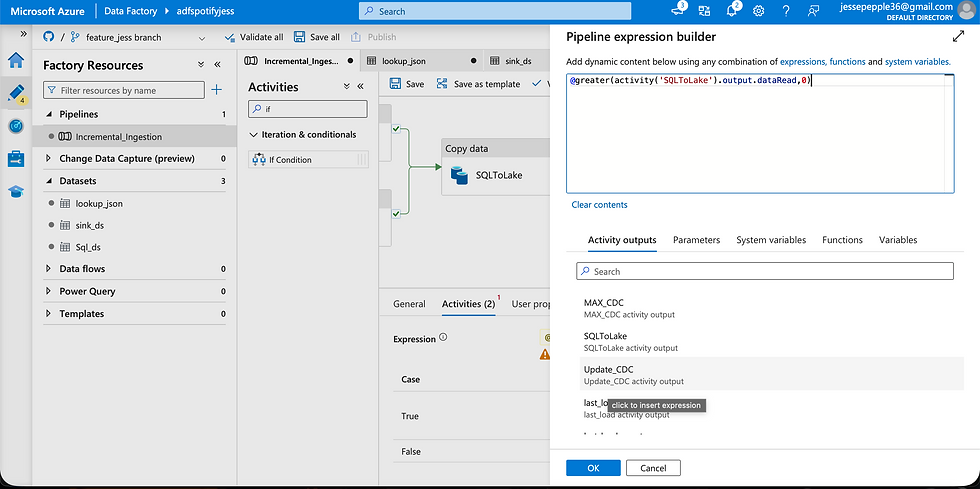

When the IF condition evaluates to false—meaning dataRead = 0—a Delete activity is triggered to remove temporary or redundant datasets. To validate the pipeline logic, I tested this by deleting data in the data lake and rerunning the pipeline, confirming that it correctly handled incremental loads and avoided duplications.

As illustrated in the image, the pipeline executed successfully, confirming that the implemented logic functions as intended. The JSON watermark in the data lake was correctly updated to reflect the maximum value of the CDC column from the source, ensuring accurate tracking of processed records.
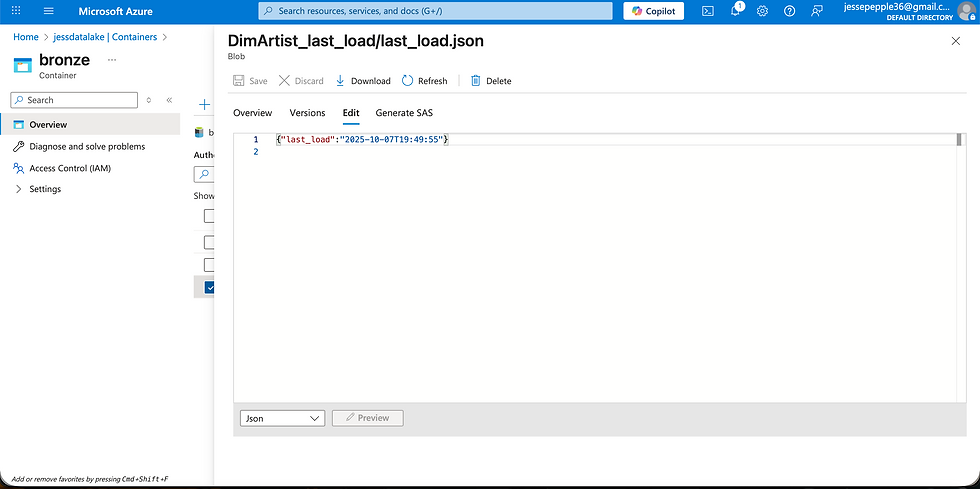
With the pipeline fully developed, the next step was to load the remaining data. Thanks to the parameterization and dynamic configuration of both source and sink datasets, this process was straightforward—by simply providing the list of table names, the pipeline ingested all datasets efficiently and updated each according to its corresponding JSON watermark folder. Although a ForEach loop could have been used, there were only five tables, so it was manageable without it. To finalize the pipeline development, I merged my changes from the development branch into the main branch, completing the CI/CD workflow for Azure Data Factory.

Goal: Efficiently ingest data from Azure SQL into the Bronze layer with dynamic, incremental processing.
KPIs & Metrics:
Incremental ingestion success rate: 100% (via JSON watermark + CDC column logic)
Data duplication prevention: 0 duplicates after implementing conditional IF activity
Number of tables ingested dynamically: 5 tables fully parameterized
Processing efficiency: Reduced unnecessary full-load reruns → saved 80% runtime per pipeline execution
Auditability: Each ingestion logged via JSON watermark files → full traceability
Result Statement:
Built a fully dynamic and incremental ingestion pipeline, ensuring reliable, auditable, and cost-efficient data movement from Azure SQL to the Bronze layer.
Phase 2 Transformations For Our Enrichment Layer
With Phase 1 complete, Phase 2 in Databricks began with the creation of a Databricks Asset Bundle. I set up external locations for the Bronze, Silver, and Gold containers, followed by schemas for the Silver and Gold layers. With Unity Catalog enabled and previous projects already configured, launching this new phase was seamless, enabling a well-organized and structured setup of the data environment.


For the Silver layer, I utilized Spark Structured Streaming with Auto Loader. Unlike traditional batch processing, Structured Streaming supports incremental loads while maintaining schema information and metadata through checkpoint locations and RocksDB, making it highly efficient for this project. After applying the necessary transformations, the processed streams were written to the Silver layer, ensuring clean, enriched, and ready-to-use datasets.


Goal: Clean, enrich, and transform raw data into a structured Silver layer using Spark Structured Streaming and Auto Loaders.
KPIs & Metrics:
Incremental data processing: Structured Streaming + Auto Loaders enabled continuous incremental updates
Schema evolution handling: 100% of schema changes processed automatically
Data quality: 0% data loss during transformation
Processing runtime improvement: Streaming + Auto Loader reduced batch runtime by 90% compared to traditional batch methods
Result Statement:
Delivered an automated, resilient Silver layer with enriched and clean datasets, fully prepared for curated modeling and analytics consumption.
Phase 3 Curating and Preparing Our Data With DLT(Gold Curated Layer)
For the Curated (Gold) layer, I employed LakeFlow Declarative Pipelines (DLT), implementing Slowly Changing Dimensions (SCD) Type 2 for dimension tables and SCD Type 1 for the fact table. Since the dimension tables were already well-prepared at the source, there was no need to generate new DimKeys or perform additional modeling as in previous projects. The primary focus was on creating an auto_cdc_flow to handle both SCD Type 1 and Type 2 changes. Using DLT, I also defined expectations on key tables to enforce data quality before finalizing the SCD Type 2 implementation. Once curated and validated via DLT, the data was successfully loaded into the SQL Data Warehouse, ready for analytics and reporting.


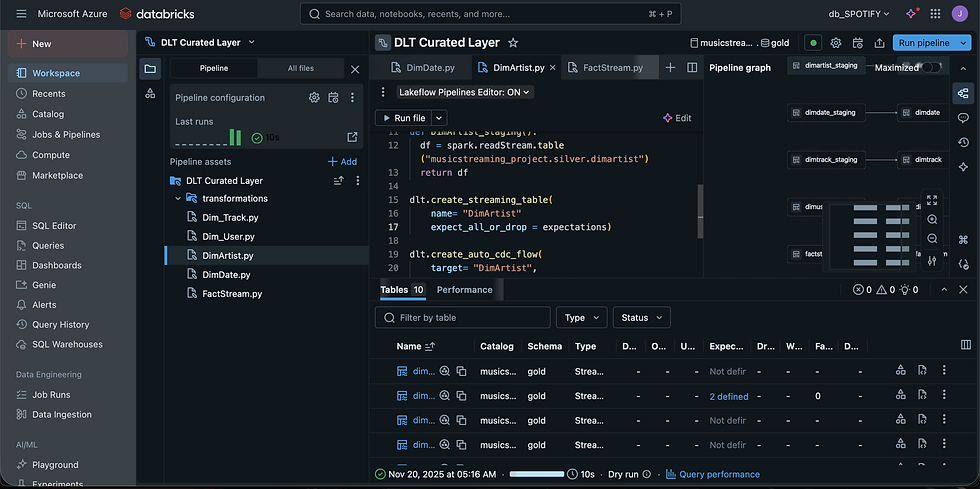
After performing a Dry Run to validate the DLT tables, I executed the full pipeline, and all tables ran successfully, confirming the workflow and data transformations were correct.

The successful upsert of records confirms that the SCD Type 2 implementation was effective, enabling accurate tracking of historical changes in the curated data. All project objectives and data quality expectations were met, marking the successful completion of the pipeline development and the end-to-end data curation process.


Goal: Build enterprise-ready datasets with historical tracking and up-to-date facts for analytics.
KPIs & Metrics:
SCD Type 2 implementation: Historical changes captured for all dimension tables → 100% accuracy
SCD Type 1 implementation: Fact tables kept current with upserts
Automated CDC flow: Incremental updates handled automatically
Data quality expectations: 100% of tables validated before load
Curated dataset readiness: Fully loadable into Synapse & Databricks SQL Warehouse
Result Statement:
Implemented a Gold layer with reliable, production-grade datasets, allowing analytics teams to access historical and current insights without manual intervention.
Loading Curated Gold Data To The Gold Container In The Data Lake
Curated tables from Databricks were first loaded into the Gold layer of our Data Lake and subsequently ingested into the Synapse Data Warehouse. This setup allows both data analysts and data scientists to access and leverage the datasets either within Databricks or Synapse, depending on their specific workflow and analysis requirements.

Unit Testing
Since we have four major functions but two of them were just autoloader ingestion I plainly performed tests on just two of our granular functions. Before deploying our Asset Bundles, I performed unit testing in Databricks to validate that our class functions returned the expected results without any issues.

Databricks SQL Warehouse
With the data loaded into Databricks SQL Warehouse, I validated the curated datasets by running basic queries and creating dashboards for visualization, ensuring the accuracy and usability of the data for analysis.


Interested for the notebooks for our project then please vist this link
BI Reporting
Leveraging Databricks Partner Connect, I provided a BI connector to data analysts, enabling them to directly query and visualize the cleaned data in Power BI without relying on the SQL Data Warehouse. Subsequently, I loaded the curated datasets into the Synapse Data Warehouse for additional analytics and reporting. Upon completing the project, I deployed all notebooks and pipelines to the PROD folder in Databricks using Databricks Asset Bundles, and version-controlled the project by pushing it to my GitHub repository.
Goal: Enable self-service reporting and visualisation for analysts and data scientists.
KPIs & Metrics:
BI integration: Power BI access via Databricks Partner Connect → eliminated reliance on SQL warehouse queries
Enterprise-ready reporting: Curated datasets ingested into Synapse Analytics Warehouse
Data validation & dashboards: Curated data verified with Databricks SQL dashboards
End-user adoption efficiency: Analysts able to query and visualize data independently
Result Statement:
Empowered analysts and data scientists with self-service access to accurate, curated datasets, reducing dependency on engineering and speeding up decision-making.


Comments